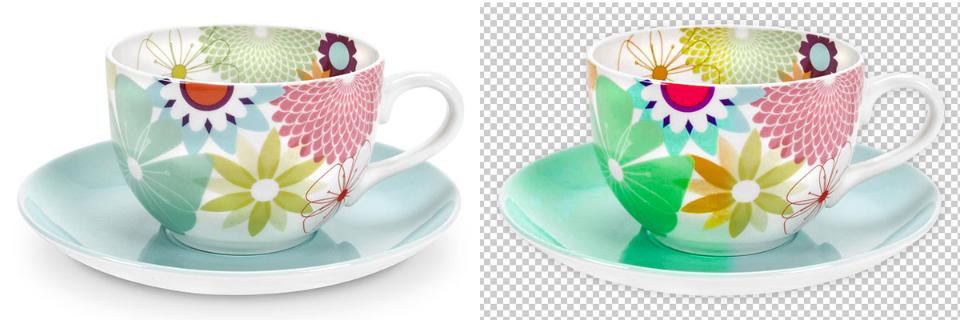
Welcome To Color Center International
Color Center International (CCI) is an internet based image editing and digital media company that utilizes the most talented Photoshop and web based experts in the industry. We specialize in clipping path, color correction, photo retouching, drop shadow, raster to vector conversion, graphic design, and desktop publishing. We can also design your website with online animation. As you can see, we can handle almost anything that utilizes digital media. Our promise to you, you will be satisfied with our work, or you will not be billed. So, give us a try and judge for yourself of the job we provide to our clients. Call us at anytime with questions, or if you want, we can come to your place for further questions and instructions. We will do whatever it takes to make you happy.
Color Center International Team
Why choose CCI?
- Color Center International provides its client with 100% satisfaction guarantee.
- Our first priority is to maintain high quality image editing service for all our clients.
- For quality control, we use the triple check systen to ensure job is done perfectly.
- We ensure quick turnaround time without sacrificing any quality and price.
- After receiving an order with specific requirement, you will be given a quotation within one hour.
- We offer volume discount and easy monthly payment to meet your payment schedule.
- We are here twenty four hours a day, 7 days a week for customer support.
About Us
Color Center International
50, Purana Palton Line,
Dhaka-1000, Bangladesh
Contact us at anytime:
+8801875178494
Email: info@colorcenterint.com
www.colorcenterint.com
Clipping Path
Taking pictures now a day become a trend. We can capture our time by taking any picture and with the help of our smart devices; it’s very much easy to take any kind of photos anywhere. But the captured pictures can’t please us always because of some unnecessary background or color or any unwanted thing caught unintentionally in the photo frame.
There is a solution to this problem called ‘clipping path’ which anyone can use to make their captured picture perfect in the way or another. Clipping path is an option that allows you to cut anything from your picture to make it as you wanted. For removing background clipping path option is too much popular and used most of the time by the editors of the photos.
Clipping path makes it so easy that anyone with basic knowledge of photo editing can do it very easily and can make their favorite photos more attractive to others. Clipping path is a Photoshop tool like the other tools of Photoshop. The effect of this is removing any parts of the photo (most of the time the background) and highlight the other parts of other photos. The people who like playing with Photoshop use this to make any photo better. The pen tool of the Photoshop application does this marvelous job for us. It selects the main subject of the photo and removes the unwanted section of the photo to make the photo more attractive. But if anyone who wants to remove only the background there is many other options in Photoshop like the Background Eraser, Lasso tool, Channel mask tool etc. But among of them, the pen tool is the best option to remove the subject with good quality and make the best of it. So if you want to remove the background of any photos of you with the help of pen tool, then here is the process to follow.
First, open your Adobe Photoshop application from your PC or laptop. Then insert the photo that you want to edit. Pick up the pen tool which is usually on the left side with the other tools. Now create a path around the object that you want to move and close the path by clicking there where from you started selecting. When you are done go to the path panel and double click the work path. It will create a new path you can also rename the path for the further use. Now go to the path panel, create a clipping path to remove the selected area smack on clipping path from the drop-down menu then hit ok to finish. Finally, save the clipping path photo where you want to save it or replace it with another photo as per your need. So this is the easiest way to use the clipping path option on Adobe Photoshop for editing or removing the background of any photos. Now you can play with this clipping path option to make any of you photo better than now.
We are providing many services one of service name "Clipping Path Service"
All Rights Reserved © 2017 Colorcenterint.com
Raster to Vector
Most of us are familiar to raster and vector. Especially who are webmasters, web designers, photo editors and others who are interested individuals. Raster and vector both are very important part in Photoshop. When we edit any picture most of the time we convert our picture from raster to vector. Sometimes we have to edit our product picture so that our product picture looks more attractive than others. Sometimes we edit picture for our profession. Then we have to convert our picture raster to vector in Photoshop.
Raster and Vector definition
At first we have to know what raster pictures areand what vector pictures are. Those pictures are made of pixels and each pixel has different color they are called raster picture. And those pictures are made up of a path are called vector pictures. The paths can be line, square triangle or rectangular.
There are many reasons to edit our picture. But it is very difficult to edit any raster image without the loss of any information. But editing any vector image is very easy and there don’t have any chance to lose any information. Vector images can scale to a large size and not lose any image quality.
Editing softwares
There are many software those are helpful for us to convert our image from raster to vector. Illustrator is one of them. Not one of them but the best of them. In this software pathfinder is very useful and 3D is also very attractive. But most of the time we don’t use them. Those are used only when we want to make our image cool, attractive and completely different from others. Maximum time we use live trace. It is very simple and very easy to work with. It can convert raster image to vector image. Without live trace there are many separate applications that work like live trace. Those applications are able to convert raster image to vector image. But live trace is very simple and advanced.
Steps to follow
When we convert a raster image to vector image in live trace then there are two steps. The first step is illustrator adjust raster image. The second step is the most important step, it draws vector path that create completely right vector art.
At first we have to trace image. For tracing image we have to choose object-live trace-make. After doing this we get 14 different tracing preset. Then we have to choose one of them. After doing this we have to preview our vector image. If we’re satisfied with the picture then we preview that in raster image. We also preview the image with vector image with trace image. If we want to adjust our tracing result we have to go to object-live trace-tracing options.
Visit Raster to Vector
©Copyright www.colorcenterint.com 2017
Color Correction
Those people who are interested about photo editing or want to know how to edit your image are familiar with color grading. It is a wonderful process that enhances the video image, motion picture or still image. Color correction and the generation of artistic color effects encompass color grading. In this article we will discuss about color correction.
Most of the people think that color correction is a very tough work. But it’s not true. It is very easy. It is the basic term of Photoshop or photo editing. It is nothing else, just a step of film making process. Sometimes we make some excellent videos or shoot pictures but those pictures can be damaged or destroyed. And all of our hard work goes in vain. Then we have to face many problems. We have many choices but the easiest and most popular option is color correction. If we want to make any image too colorful or cool then we can use color correction.
For example we choose an image having colors of gray and red. Red is the light area and gray is dark area but if we normally apply grey filter the entire image then our photo looks very cool and attractive. It also looks very colorful and attractive. But we have to be careful to use color because we can’t use every color. We can use only those colors that make our picture more natural and attractive. We all know that in an image there are many pixels. Sometimes we have to change a few pixels for color correction. And when we are doing it, we have to face four major problems. They are: selecting one specific color, selecting one specific pixel, distinguishing between two close pixels, human inadequacy.We have to avoid those problems. Because if we don’t avoidthem, our image looks very weird.
For doing color correction there are a lot of applications. Some applications are paid and some of applications are full free for everyone. Some paid applications are: iMovie, perfect photo, Video grade photo editor, Movie Looks HD, Public studio and graphics design, NFB Stomp Studio, Vivakids’ ABC and etc.Some of applications are completely free for everyone. Those are: You tube capture, Mill color, Auto adjust, Snap seed, My create lite and etc. Adobe After effects is another photo color correction application and it is the most popular application. It is best for color correction.
Every one works at different sectors. They are expert only in their sectors. Singers only know how to sing. Those who are working for color correction they are called colorists. They have option to use some special hardware device. Those devices make their life easy. But if we want to do all the things ourselves, that’s impossible. I mean, no one can do everything in life. So it’s better to give the task of a professional to the professionals. At Color Center International we take pride in our image editing service. Try us today and you will never look for a second one.
Visit Clipping Path Service
©Copyright www.colorcenterint.com 2017
Bad quality image, what to do!
Your school reunion is going on. You are in a party. Everybody is reliving the moments. Everyone wants to frame the moments with his/her closest friends. There are click-clicks and flashes everywhere. Your phone memory is being filled up with all the photos you are taking. At one time, night becomes deep. You guys are ready to end the party and head back home. Friends are asking you to send them their photos. You said okay and returned to your house. Reaching there you think, it’s quite difficult to send all the photos to everyone individually. So you decide to upload the photos on Facebook or Instagram and tag them so that they have the access to those photos. So you open your gallery and start selecting the photos that you want to upload. And you are hit with a problem!
Some of the good quality photos are a bit altered because of the light or it became hazy for some reason. The focus might not be good. There may even be some dark spots on your face(s). Will it be alright to upload those too? When the occasion is so special, you want everything to be perfect. So what would you do?
Don’t worry. You don’t have to upload and publish those defective photos. Now you have the chance to edit these defects. If you use Adobe Photoshop, you can correct all the deficiencies in the pictures.
Photo retouching has become most widespread with the increasing popularity of different social media sites. Everybody wants to look perfect now. So you can’t be any different. If there is a defect in your photo like darker skin shades, over exposure of light or anything else, with the Photoshop you can correct all the anomalies.
Though you can do all these things on your own if you are a pro at Photoshop. But if you are not, you are advised to contact with the professionals. There are some really good professionals who can do some excellent photo retouch for you. Searching for some trusted names for the task, Color Center International comes up. They are a Bangladesh based company having their offices in U.S.A also. Whether the photos are for your personal use or for your business organization, they will provide you the best retouch service in the market. You need to just contact them and tell your need, and they will do the rest.
See also Clipping Path Service
Image Masking
Image masking is a process of software like Photoshop to hide some portions of an image and to reveal something. Image masking is a non-destructive process of photo manipulation. Most of the time, it enables you to adjust and tweak the mask later if necessary. It is efficient and more creative way of the photo manipulation services.
There are two types of Image masking such as layer masking and clipping masking.
Layer masking:A layer mask is the type of mask people generally refer to when they talk about masking in Photoshop. We can hide or reveal the portions of the images or we can change the turbidity of the various portions of an image using masking. If we change the turbidity of a layer from the layer panel’s turbidity slider, turbidity of the whole image will be changed. With the layer mask we can change the glance of the layer. We can make any portion completely unseen or partially seen. If we paint with the black on the mask, that portion of the image will be transparent. Which means, it will make seen the layer beneath. The image will be partially transparent if we paint with any grayscale color, depending on the % of gray we choose for the brush. If we choose a soft brush, the edge transformation will be smoother.
Clipping masking:Clipping masks use one layer to determine the transparency of another layer. For clipping mask we place a layer at the bottom of the layer we want to apply the transparency. We should control the visibility of the layer above. It may seem a bit inconsistent for newbies if they compare the behavior of clipping mask with the layer mask. It may seem like that clipping mask is working inversely balancing and comparingto the layer mask. we paint using black color on the mask to make the pixels of the layer unseen; but with the clipping mask we are doing the turbidity. The top layer will be opaque or seen if the bottom layer has some pixels in that area. If the bottom layer doesn’t have any pixel, the pixels on the top layer will be transparent or unseen.
In this era of trade and business image masking has become an important tool for everyone. Businesses are hiring professional photo editors to do the task for them. That way they can ensure the best possible result.
Image Shading
Sometimes it so happens that depicting an image in just an ordinary shape looks a bit monotonous. So images are given a shade to magnify the depth of it. By giving a shade a picture can look more eye-catching.
What is image shading?
In computer graphics, shading refers to a process where an image is altered in its color in the 3D scene, based on its angle to lights and its distance from lights. The idea is to create a realistic effect. Shading is performed during the rendering process by a program named Shader. In the image shading process, angle to light source bears an immense importance. Shading changes the colors of faces in a 3D model based on the angle of the surface to a light source(s). For example, if you take a box, it has 3 sides. When it is depicted in plain, it is really hard to tell which side of the box is front facing. So if you turn the faces to different colors, it will look more authentic.
Different types of shading
There are two different approaches by which one can do image shading. One is Flat Shading and the other is Smooth Shading.
Flat shading is defined as a lighting technique used in 3D computer graphics in order to shade each polygon of an object based on the angle between the polygon's surface and the direction of the light source. The different colors of the surfaces and the intensity of the light source play a vital role in the process. It is usually used for high speed rendering. As a result of flat shading all of the polygon's surfaces are colored with one color that allows differentiation between adjacent polygons. Clipping Path Service
In contrast to flat shading, the color of the surfaces of an object changes from pixel to pixel in smooth shading. It assumes that the surfaces are curved and uses interpolation techniques to calculate the values of pixels between the surfaces of the polygons. There are two types of smooth shading; gourmand shading and pong shading. Whichever technique you apply, the look may be slightly different, but the basics are the same.
Why image shading and whom to choose?
As we’ve said earlier, image shading is just for adding a realistic aura to your images. And it is better to choose some professionals for your job. Services like Color Center International and many more are some trusted names in this field.
Mirror Image Reflection
Have you looked into a mirror this morning? You sure have. What did you see? A reflection, of yourself. Did you have a closer look? May be, maybe not. Do you know what I happen to enjoy the most? Watching a batsman playing the shots wrong handed through the glasses. I find it hilarious. I don’t know if anyone is just as weird as me but hey, what is life if there’s no weirdness in it!
When we look into a mirror, we see a reflection of ourselves. The technical reasons behind this is way past a normal head like me. So let me be as sportive as I can. You know there’s light rays everywhere, right? Okay, when you look into a mirror, the light ray comes from one corner and gets reflected from the other. The reflected ray hits your eyes, making you able to see your reflected image in the glasses. The front camera in your smartphone also works on the same basic.
If you are wondering why do we need mirror images, then let me ask you a simple question. Have you seen an ambulance lately? Well, except for the get up, how do you recognize it as an ambulance? The word AMBULANCE is written inverted on its bonnet, right? Now let’s say you are driving and an ambulance is honking the horns right behind you. There is a loud music on your stereo so you are unable to hear the horns. And the ambulance has an emergency. So what would you do? You will see it coming in your rear view mirror. And you will read the words, give it some space to let it pass. That’s the importance of a mirror image. Our other service Clipping Path Services
In the real world mirror images have a profound importance in various fields. With this kind of images, it is really easy to draw the attentions of your viewers. I mean, who doesn’t like to see a picture like the Mount Hood reflected in the Mirror Lake in Clackamas County, Oregon! Like this reflected image, there can be a trillion photos found on the internet. Business organizations are constantly using these images to attract their customers’ attention.
If made and used wisely, mirror images can be a strong weapon to generate more leads. So it’s always advisable to leave the responsibility on the shoulders of the professionals. Or else, it can become a great blunder if not done correctly.
We also Provide
Photo Manipulation
Photo manipulation is an art of making change of photo’s look. In this digital age, we can see that photos are everywhere. Generally, we manipulate them for many purposes such as advertisement, portfolio, magazine, trademark, publishing book, film industry, modeling, gallery artwork and so many. There are two categories of photo manipulation first one is technical manipulation and the other is creative manipulation.
Mainly, Technical manipulation is used for restoration and enhancement of the quality of a photo. The most common between them are the modeling advertises. Almost all models have been digitally airbrushed, retouched, corrected and digitally altered in every way to achieve that perfect look. This is more noticeable in lingerie ads where the skin has been retouched in such a way that appears flawless from top to bottom. The photo is smoothed using a healing brush, which automatically removes blemishes and spots from the skin. By clicking few, you can get nice and lain skin.
On the other hand, creative manipulation is a special form of art. It is used in commercial industry for advertisements purpose. Creative manipulation can create extraordinary photos that come right off the page with the help of photo composition. Multiple photos are used to create a single photo or 3D graphics design. Overall, you need a creative mind to make creative photo manipulation.
For photo manipulation, you must need a software or program to make change of photo’s look. There are a lot of software or program such as Affinity photo, Pixel, Serif Photo plus X8, acorn, GIMP, Photoshop elements 14, Adobe Light room, Adobe Photoshop, Corel Paint Shop Poland so many. You have to install one of them on your computer for photo manipulation. You can adjust photo’s colors, contrast, white balance (i.e. gradational retouching), sharpness, noise, removing elements and whatever you want.Our other service Clipping Path Services
The most popular photo editing software is Adobe Photoshop for photo manipulation. It is very easy to use and have a lot of features. But it’s a bit tough to handle this software if you don’t have any idea. There is a solution to that problem too. There are a number of professional services who can do that for you. What you have to do is, you have to contact one of them and state your demand. They will provide you a custom quote if needed. If that’s okay with you, you just give them the order. And they will do the finest job just as you want.
Our Other Service:
Bad quality image, what to do!
Your school reunion is going on. You are in a party. Everybody is reliving the moments. Everyone wants to frame the moments with his/her closest friends. There are click-clicks and flashes everywhere. Your phone memory is being filled up with all the photos you are taking. At one time, night becomes deep. You guys are ready to end the party and head back home. Friends are asking you to send them their photos. You said okay and returned to your house. Reaching there you think, it’s quite difficult to send all the photos to everyone individually. So you decide to upload the photos on Facebook or Instagram and tag them so that they have the access to those photos. So you open your gallery and start selecting the photos that you want to upload. And you are hit with a problem!
Some of the good quality photos are a bit altered because of the light or it became hazy for some reason. The focus might not be good. There may even be some dark spots on your face(s). Will it be alright to upload those too? When the occasion is so special, you want everything to be perfect. So what would you do?
Don’t worry. You don’t have to upload and publish those defective photos. Now you have the chance to edit these defects. If you use Adobe Photoshop, you can correct all the deficiencies in the pictures.
Photo retouching has become most widespread with the increasing popularity of different social media sites. Everybody wants to look perfect now. So you can’t be any different. If there is a defect in your photo like darker skin shades, over exposure of light or anything else, with the Photoshop you can correct all the anomalies.
Though you can do all these things on your own if you are a pro at Photoshop. But if you are not, you are advised to contact with the professionals. There are some really good professionals who can do some excellent photo retouch for you. Searching for some trusted names for the task, Color Center International comes up. They are a Bangladesh based company having their offices in U.S.A also. Whether the photos are for your personal use or for your business organization, they will provide you the best retouch service in the market. You need to just contact them and tell your need, and they will do the rest.
Photo Retouching Service | Color Center International

Photo Retouching
Photo retouching is a tricky part of graphic designing. Even a single photo can cost a lot to produce, so finding a small imperfection on an important shot you thought was perfect can not only waste a lot of time, but also money. Color Center International (CCI) has worked with hundreds of companies all over the world to help improve their images via photo retouching service by removing spots or blemishes from images in addition to more advanced color correction work. Color Center International can remove unsightly marks from any surface and ensure that your images are faultless in every way.
Photograph retouching is an art where the output image improves the original photo skin. Photo Retouching Services help to improve and enhance the quality of an ordinary image to an extraordinary Image. One can use this to extract the bad composing elements, put in more interest, add color to a black and white image. Retouching of a photograph can also be used to create promotional shots for businesses. Photo retouching usually applied to human face or to make your product’s attractive. Professionals need huge experience for retouch a new photo. Color center International (CCI) is able to tackle any task from a simple red-eye correction to a total overhaul of multiple image components. Skilled photoshop retouching specialists of CCI always have to concern remove marks, or blemishes from your images. We will also help you to finally touch specific undesirable factor into your photos.
Color Center International can step in to ensure that your images are finished exactly the way you want them. Whether you want to restore skin details and texture to a photo or add warmth and glow to a picture for a magazine layout, Color Center International has the expertise and setup to help quickly and proficiently. We can improve natural color and tone to outdoor images or add new elements to indoor photo shoots.
CCI always start with a service plan for your specific photograph retouching projects and form logical processing requirements. CCI has highly qualified operators who can accept any inputs you will provide for image processing. CCI team is well trained to give you a clear idea of how the image will be treated and also have the knowledge to understand what you want from us. Our well trained image editors apply their thought on your comment and can deliver well acceptable output to our valued clients. We are able to provide you high accuracy output.
We can easily remove all typed of noise from your images. Removing those unwanted elements is the major object for photo retouching services of CCI. Client’s satisfaction has most important value in our photo retouching service. It’s our duty to fulfill your demand what you are looking for. Just send us a sample, we will exactly make your images like your sample. Because, we follow the proper retouching steps for your services.
Photo Retouching
Our offshore graphic studio is available at any time of the day or night and we can provide quotes within one hour of submission. Thus, if you want to get an idea of your options or need a rush job done overnight, we can help. Moreover, we offer 24 hour email and online support. So you can make an enquiry any time, and rest safe in the knowledge that one of our friendly advisers will be able to help you whatever the time of day.
Color center International always provides you a reasonable price. The price for a photo retouching service starts from US $ 4.00 per image. But the conversion varies according to complexity. The turnaround time is 24 hours. We are here with all types of retouching expertise, so don't wait, contact us now at http://www.colorcenterint.com.
Retouching process, CCI adopts
At first we remove unwanted elements from your images which you don’t wish for. Subsequently objects are added to your photo that means we can merge two photos at a time. Adding or removing objects is the main issue for photo retouching services. Addition of object will make a new illusion of your photos. Assume, you have a furniture photo and you want this furniture in natural background. After that we merge those two images for you. Making your image realistic is our main motto and so we always add suitable elements to your images. That will make your photo more attractive. Airbrushing is also a part of our photo retouching service.
Clipping Path Service
You are in the roofing business for the last couple of years. You always take pictures of your completed tasks. You are planning to use these images to add to your website. While taking the images there may be some elements which trespassed into the frame. The image looks good but not presentable. And with a new website, you want everything to be A-Okay. So what do you do? You take the help of some image editing software’s.
What are image editing softwares?
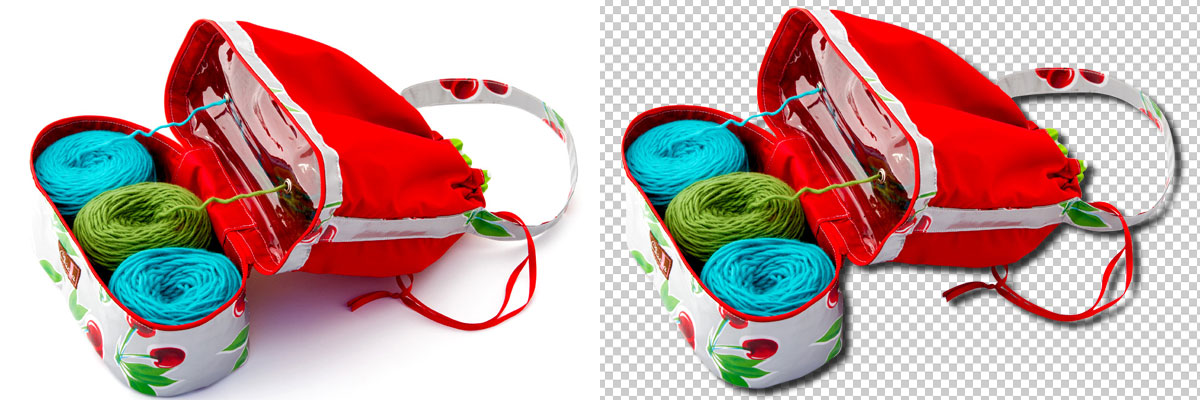
In this era of photography, you probably don’t need a thorough introduction of what an image editing software is! I mean, who doesn’t know the name of Adobe Photoshop! There are some more like it. For example, there are Adobe Indesign, AdobeLightroom, Corel Paintshop, Pixlr etc. With any one of them you can edit your image to give it the finest touch. If there is any unwanted element in your image; if it is on the main body, you can edit it and if it is in the outline, you can just cut the main part of your image without the background and give it a new background. Sounds amazing, right? Now let us have an insight how the background can be changed.
When there is an unwanted element in your outline, you can clip the main body of your image. All you have to do is open the image in any of the above mentioned editing software and select the path along which the software will crop your image. Once the path is selected, just click on the option that says clip. And the main image will be cropped without a background. Now you can set the image on any background you choose.Photoshop clipping path is best suited for this purpose.
Types
If you are working as an image editor, you must know that there are two basic types of clipping path. An Inclusive Path is one which makes sure that the part inside the path will be preserved. Contrary to that an Exclusive Path ensures that the elements from the path outside will be preserved.
Now that you know about the clipping path, you may try it for yourself. But when you are a businessman, you will find it hard to find the necessary time to do everything for yourself. So you will need to hire some professionals for this purpose. There are practically hundreds of clipping path service out there who can do the work for you. Color Center International is one of such companies who can provide you the best service in the industry. With a team of dedicated professionals, they practically thrive on serving their clients in the best possible way. Any image related issue like image manipulation, image masking, image shading, color correction, single clipping path, multiple clipping path, photo retouching, web design and desktop publishing is available here. Just contact them today for a free quote and a free trial. In my experience, they are a reliable company to work with.
The world has gone frantic! Why I’m saying it? Because there is not a single day goes by in which new and new things aren’t coming in the market. People living in today’s world, do you know which is the biggest dilemma they have to face each day? What to choose over what! Business competition is more than ever now. Everyday newer companies are emerging with the same product. Which to choose and which to deny? How the people on earth decide that? Well, the answer is as simple as the question is hard. They choose between the options only by first glance.
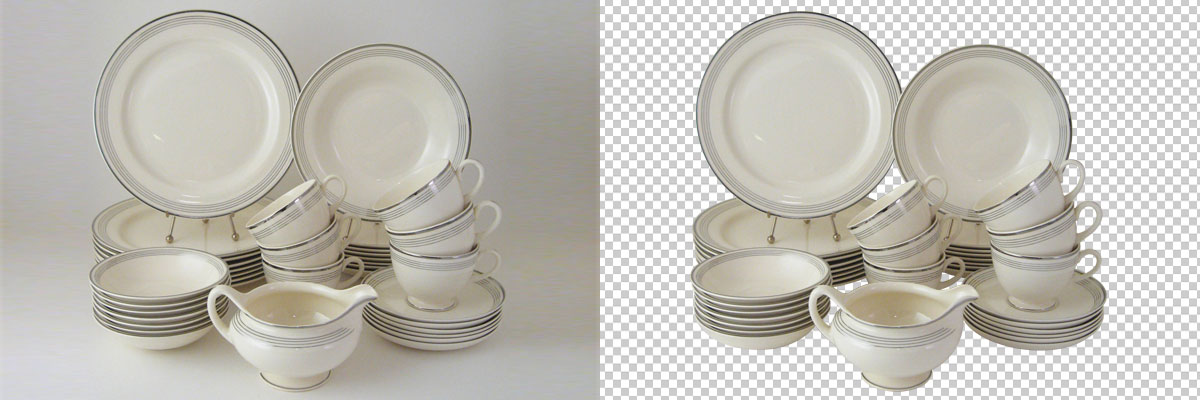
If you see an ad on the social media like Facebook, Twitter or Pinterest, you choose the ones that are better-looking. You may not know about the product, may not be sure whether it will be satisfying or not, but the moment you see a nice ad, you subconsciously opt for the product. THAT, my friend, is the power of images today in the world. Because no ad is attractive without a marvelous photo of the product companies are offering. So what do the companies do to publish these great ads?
There are a lot going on in the back end of the ad. First and foremost, a creative idea is needed. Then comes the option of collecting the necessary resources for the ad. Resources also include related images. Now, when the companies are collecting images, it’s not like there are images on the internet or wherever they are collecting from, so that they can use right away. They have to do some editing of the photos to make it look more attractive.
Editing may include a series of efforts. The photos may need one or more of the following edits:
- Clipping path
- Image masking
- Photo retouching
- Image manipulation
- Image shading
- Mirror image reflection
- Color correction
Now, when the company is doing thousands of dollars of business, they don’t really have the time to appoint an image editor. So most of the time they are seen to have appointed a clipping path service. Color Center International is such a service offering company.
If you need a professional team to handle all your image editing tasks, you will be really satisfied with them. From my personal experience I can say that they are a very good team to work with. I had to work on a project in which I needed a considerable number of photos to be edited. When I contacted them and told them what I need, they have delivered me the Photoshop clipping pathwork on time. They are really well behaved. They know the importance of time. And on top of everything, they didn’t charge me any extra bucks for urgent work. I found their pricing really competitive. I will give them the extra credit for keeping a good communication all the time. They had even offered me a free trial, thanks to their professionalism, which helped me a lot to make decisions. If you need such kind of service, you may try them too.
Multiple Clipping Path is the method of using clipping paths to alter the colour of an individual or a part of an image, create color correction or add an additional color impact. Multiple clipping path is employed for those pictures that need isolation of parts and modify the color around individual components. Color Center International (CCI) is a world class image editing outsourcing firm that provides finest multiple clipping path service for its international clients. It is a group of extremely skilled graphics specialists which delivers top quality handmade Multiple Clipping Path Services to our valuable clients from all around the globe to achieve hundred percent satisfaction.
![]()
Multiple Clipping Path Service not only changes the color of the item within the photograph, however, also effectively perform multiple filling which provides completely a novel look. Our Multiple clipping path service ensures all sorts of opacity modification, rotational modification and also the manipulation of the size of an object of your image. By the multiple clipping path service multiple texture and image shadowing could be also added into the same image. Adobe Photoshop, illustrator, CorelDraw, Fireworks, etc. are popular software to perform multiple clipping Path. However, principally used software or tool is an Adobe Photoshop in the service.
Multiple Clipping Path Service is an extension to the use of the clipping path. It's additionally done to split some components of the image. It's going to be used for complex shapes as well as many easy shapes. In a word, it's utilized in numerous aspects. Professionals cinematography, printing press, magazine, newspaper publishing house, pic studio, operating for digital shooting, multimedia presentation, entertainment industry or fashion house needs multiple Clipping Path Service.
Multiple Clipping Path
CCI produces a variety of layers to complete this Multiple Clipping Path, that is a modernized version of the fundamental clipping path for pictures that require to separation of specific components. There are totally different demands of clients who can individually change in color level, multiple fillings, transform, opacity change, image rotation, change in image size and a lot of in multiple clipping methods. Totally different filters and effects also applied to picture perfection.
There are three kinds of multi clipping path that are color separation, object and vector path. CCI promises you to our valued, credibleness and final work pleasure. It is the method of using clipping paths to remodel of a photograph or components of a picture. Multiple clipping path level, translate in any figure in correspondence of opaqueness modification, and change in size of it, circulating and to a greater extent.